

Description
Download BCC Trade APK – trading app, BCC Invest, stock trading, financial instruments, real-time quotes, portfolio management, investment tools, mobile trading, secure trading, online brokerage, financial app
Overview
BCC Trade is a mobile trading application developed for clients of BCC Invest who have entered into a brokerage agreement. Designed to support on-the-go investment management, the app enables users to execute trades in a variety of financial instruments, including stocks, bonds, ETFs, and repos. It provides real-time quotes for selected securities, allowing investors to make informed decisions based on current market data. The application serves as a digital gateway for clients to access their investment portfolios, monitor transaction history, and utilize analytical tools such as graphing features and currency conversion utilities.
Target users include individual investors and active traders who are already registered with BCC Invest and have completed the necessary KYC procedures. The app is particularly suited for those seeking a secure, mobile-first approach to managing their financial assets. Real-world use cases include checking portfolio performance during market hours, executing timely trades based on analyst recommendations, and transferring funds between accounts. The platform integrates with BCC Invest’s digital infrastructure, ensuring alignment with official brokerage processes and regulatory standards.
As a client-specific tool, BCC Trade does not serve as a standalone investment platform. Access is restricted to verified users who have signed a brokerage agreement using an EDS from the National Certification Authority. This ensures compliance with digital identity and transaction security protocols. The developer, BCC Invest, appears to prioritize secure, regulated access over broad public availability.
Key Features & Capabilities
- Trading in Multiple Financial Instruments: Users can buy and sell stocks, bonds, ETFs, and repos directly through the app, supporting diversified investment strategies.
- Real-Time Market Quotes: The app delivers up-to-date pricing data for selected securities, enabling timely trading decisions.
- Portfolio Management: Investors can view real-time portfolio summaries, including asset allocation, current value, and performance metrics.
- Transaction History: A detailed record of all trades and transfers is maintained, allowing users to track investment activity over time.
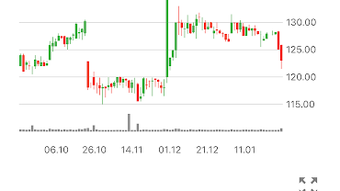
- Graphing Tools: Built-in charting features support technical analysis, helping users visualize price trends and patterns.
- Currency Conversion: Facilitates trading and fund transfers across different currencies, useful for international investors.
- Fund Transfers: Users can initiate money transfers between linked accounts, streamlining capital deployment.
- Analyst Reviews & Recommendations: Access to expert insights and trading suggestions from BCC Invest’s research team.
- Secure Authentication: The app employs encryption, electronic signatures, and one-time SMS passwords to protect user data and transactions.
These capabilities are designed to streamline the investment workflow for active traders. For example, a user can check real-time quotes, analyze a stock’s performance using graphing tools, review an analyst recommendation, and execute a trade—all within the same session. The integration of currency conversion and fund transfer features further enhances the app’s utility for cross-border investing. Security measures are aligned with digital transaction standards, ensuring data integrity and user authentication.
User Interface, Workflow & Performance
The user interface of BCC Trade appears to be structured around core investment functions, with intuitive navigation designed for efficient access to trading tools and portfolio data. Key sections such as the dashboard, trading screen, portfolio overview, and transaction history are likely organized to minimize user effort during active trading sessions. The workflow is optimized for speed, allowing users to move from market research to trade execution in minimal steps.
Navigation is expected to follow standard mobile app patterns, with bottom navigation bars or side menus for quick access to major features. The design likely prioritizes clarity and readability, especially when displaying financial data such as price charts, portfolio values, and transaction details. The app’s performance is expected to be stable under normal usage conditions, though exact resource usage details were not specified. The developer did not provide information on CPU or RAM consumption, so actual performance may vary based on device capabilities.
Stability is likely maintained through integration with BCC Invest’s backend systems, which are designed for regulated financial operations. Users should experience consistent behavior during trading sessions, with minimal risk of crashes or data loss. However, general performance observations are based on typical behavior for similar financial applications and cannot be confirmed without direct testing.
Compatibility & System Requirements
BCC Trade is available exclusively for Android devices. The app supports the latest versions of the Android operating system, though specific version requirements were not listed. Installation size is 18.5 MB, indicating a lightweight footprint suitable for most modern smartphones. The developer did not specify exact hardware requirements, such as minimum RAM or processor speed.
Compatibility information was partially provided, with the OS limited to Android. No details were given regarding minimum screen resolution, storage space beyond the installed size, or supported device types. The developer did not provide additional system requirements. Users should ensure their device meets standard Android app requirements for app installation and functionality.
Pros and Cons
Pros
- Secure access via encryption, electronic signatures, and SMS-based authentication
- Real-time quotes for accurate market decision-making
- Comprehensive portfolio and transaction tracking
- Integrated graphing tools for technical analysis
- Support for multiple financial instruments including stocks, bonds, ETFs, and repos
- Free to download and use
- Access to analyst reviews and trading recommendations
- Efficient fund transfer and currency conversion features
Cons
- Available only to BCC Invest clients with a signed brokerage agreement
- Requires KYC verification and EDS from the National Certification Authority
- Android-only availability limits access for iOS users
- Exact system requirements not disclosed
- Performance data not provided by the developer
FAQ Section
Is BCC Trade available for iOS devices?
BCC Trade is currently available only for Android devices. There is no official iOS version listed at this time.
Do I need to sign a brokerage agreement to use BCC Trade?
Yes. Access to the app requires a valid brokerage agreement with BCC Invest and completion of KYC procedures.
Is BCC Trade safe to use?
Yes. The app uses encryption, electronic signatures, and one-time SMS passwords to secure user data and transactions.
Can I update BCC Trade through the app?
Yes, updates are typically delivered through the Google Play Store, ensuring users have access to the latest version.
Is there a license fee for using BCC Trade?
No. The app is free to download and use for eligible BCC Invest clients.
Final Thoughts + CTA
BCC Trade offers a robust, secure, and feature-rich mobile trading experience tailored for clients of BCC Invest. With real-time market data, comprehensive portfolio tools, and integrated analytical features, it supports both novice and experienced investors in managing their financial assets efficiently. The app’s emphasis on security and regulatory compliance makes it a trustworthy choice for active traders.
While its availability is restricted to verified clients and limited to Android devices, the benefits of on-the-go trading, analyst insights, and seamless fund management are significant. For users already engaged with BCC Invest, this application serves as a powerful extension of their investment strategy.
Download BCC Trade now
Guides & Tutorials for BCC Trade APK
How to install BCC Trade APK
- Click the Preview / Download button above.
- Once redirected, accept the terms and click Install.
- Wait for the BCC Trade APK download to finish on your device.
How to use BCC Trade APK
This software is primarily used for its core features described above. Open the app after installation to explore its capabilities.
User Reviews for BCC Trade APK 0
No reviews found





